The #1 Self-Hosted WordPress Push Notification Plugin

AI-powered push notifications from your own server.

The only self-hosted WordPress plugin with built-in AI automation. Send unlimited web push notifications with zero per-subscriber fees.

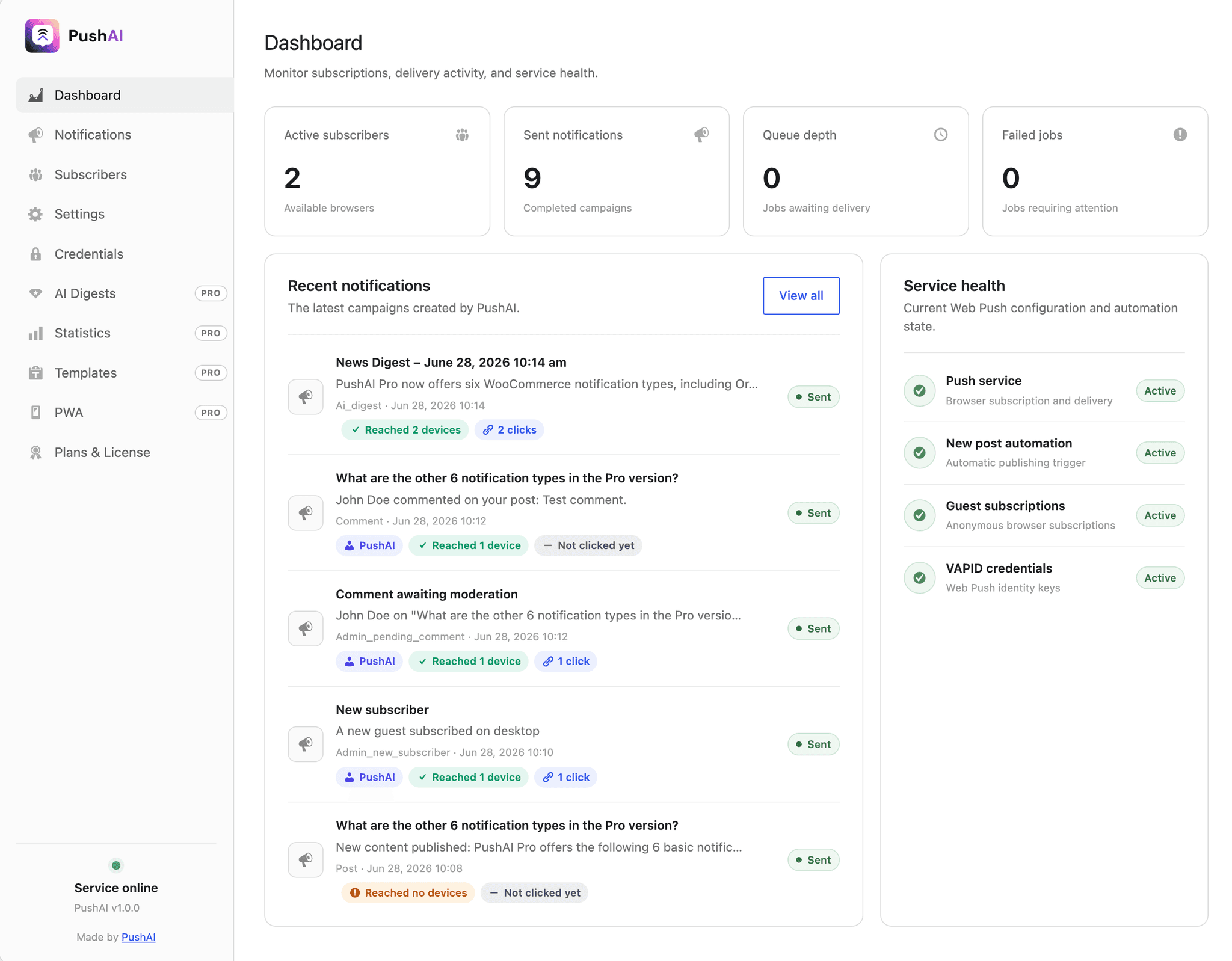
yoursite.com/wp-admin/admin.php?page=pushai
PushAI WordPress dashboard

Core Plugin Features

A complete self-hosted push stack with powerful AI automation.

Ditch the SaaS wrappers. PushAI stores your subscribers and delivery tools inside WordPress, while giving you the smartest AI features—like automated content digests and smart WooCommerce targeting—to engage your audience.

  • AI-Powered Content Digests

    Automatically summarize and send your latest posts as a push digest on your own schedule. Built-in templates ensure delivery even without an API key.

  • Unlimited Audience & Sends

    No subscriber caps, no tiered pricing. Scale to hundreds of thousands of subscribers while paying exactly the same flat price.

    New Post
    Popular!
    Digest Sent
    Subscriber
  • Native Web Push Delivery

    Send notifications directly from your own server using the native W3C Web Push standard. No third-party services or SDKs like OneSignal required.

  • Robust Background Queue

    Large campaigns go out in subscription chunks so a send cannot time out. WP-Cron delivers in the background; WP-CLI can process, inspect, and prune the same queue.

  • Smart Campaigns & Custom Templates

    Send now or schedule for later. Auto-notify subscribers when a post goes live, target specific users, and reuse notification templates for every automation.

  • Developer APIs & Webhooks

    Queue notifications from PHP, filter payloads, tag links with UTM, and — with Pro — POST signed webhooks or trigger a send from Zapier and Make.

Native WordPress Plugin

Send push notifications directly from your server without relying on third-party services. Own your data and avoid monthly fees per subscriber.

  • No OneSignal or PushEngage dependency
  • Unlimited subscribers and campaigns
  • 100% data ownership in your database
  • Email fallback to registered users without a push subscription

Seamless WooCommerce Integration

Automate cross-selling, order updates, and abandoned cart reminders to boost your sales. Trigger push notifications automatically based on customer behavior.

  • Cross-sell product recommendations
  • Order status and abandoned-cart reminders
  • Low stock and admin alerts

Built-in PWA Support

Turn your WordPress website into a Progressive Web App instantly. Allow users to install your app on their home screen and receive notifications just like a native app.

  • Installable on iOS and Android
  • Works offline and in the background
  • Native app-like user experience

AI-Powered Content Digests

Leverage artificial intelligence to summarize your latest content and send personalized digests to your subscribers at optimal times.

  • Automated scheduled digests
  • Smart content summarization
  • Built-in template fallbacks

Complete WordPress Admin Management

Everything is managed from your WordPress dashboard — no external panel to log into. Composer, delivery queue, subscriber list, statistics, and every automation setting live right inside wp-admin.

  • Composer with send-now, schedule, and live preview
  • Subscriber list with user/guest and mobile/desktop filters
  • Comment, custom post type, and opt-in prompt automation
Feature-based pricing

Invest in AI and automation, not subscriber limits.

Free gives you the complete native delivery stack, including scheduled campaigns. Pro unlocks AI digests, audience segments, WooCommerce and abandoned-browse alerts, and deep analytics. Both include unlimited subscribers and sends forever.

Core plugin

PushAI Free

The complete self-hosted push notification foundation — unlimited subscribers, unlimited sends, no third-party service needed. Free forever.

$0

  • Unlimited subscribers & notifications
  • Self-hosted — data stays in your WordPress database
  • Guest & member subscriptions
  • Manual composer with targeting and scheduled sends
  • [pushai_button] shortcode for any page
  • Auto-publish new post notifications
  • Subscriber list with mobile/desktop filters
  • Developer API, hooks, filters & WP-CLI
  • GDPR export & erasure tools
Start free

Automation upgrade

PushAI Pro

AI digests, audience segments, action buttons, A/B tests, PWA, analytics, and WooCommerce plus abandoned-browse automation — one flat price regardless of audience size.

$21/yr

  • Everything in Free
  • AI-powered scheduled content digests
  • Trending Today auto-notifications
  • Audience segments by role, device, category, or tag
  • Action buttons, A/B tests, and Zapier/Make webhooks
  • Abandoned-browse reminders
  • 6 WooCommerce notification types + cross-sell
  • Built-in Progressive Web App (PWA)
  • Signed click analytics, segment CTR & A/B CTR
  • Customizable notification templates
  • Comment & admin alert notifications
  • Priority email support
Upgrade to Pro

OneSignal, PushEngage & co.

Others

Hosted SaaS services that store your subscribers on their servers and charge per subscriber or per send as you grow.

  • Subscriber limits on free tier (OneSignal: 10K)
  • Your data stored on vendor servers
  • Per-subscriber or per-send pricing
  • No AI-written content digests
  • No Trending Today notifications
  • No built-in PWA (Progressive Web App)
  • No cross-sell automation for WooCommerce
  • Vendor branding on notifications
Core
Unlimited subscribers & notificationsPushAI FreePushAI ProOthers
Self-hosted — data in your own databasePushAI FreePushAI ProOthers
Guest or member subscriptionsPushAI FreePushAI ProOthers
Shortcode & subscriber listPushAI FreePushAI ProOthers
GDPR / KVKK export & erasure toolsPushAI FreePushAI ProOthers
Auto-publish new post notificationsPushAI FreePushAI ProOthers
Custom post type automationPushAI FreePushAI ProOthers
On-site permission promptPushAI FreePushAI ProOthers
Notifications & targeting
Manual notification composerPushAI FreePushAI ProOthers
Scheduled campaignsPushAI FreePushAI ProOthers
Subscriber-targeted notificationsPushAI FreePushAI ProOthers
Audience segments (role, device, category, tag)PushAI FreePushAI ProOthers
Action buttons & A/B testsPushAI FreePushAI ProOthers
Developer API, WP-CLI & webhooksPushAI FreePushAI ProOthers
ProAI & automation
AI-powered scheduled content digestsPushAI FreePushAI ProOthers
Trending Today auto-notificationPushAI FreePushAI ProOthers
WooCommerce order, cross-sell & stock alertsPushAI FreePushAI ProOthers
Abandoned-browse remindersPushAI FreePushAI ProOthers
Comment & admin alert notificationsPushAI FreePushAI ProOthers
Customizable notification templatesPushAI FreePushAI ProOthers
ProPWA & analytics
Built-in PWAPushAI FreePushAI ProOthers
Detailed analytics & UTM trackingPushAI FreePushAI ProOthers
Segment and A/B click-through ratesPushAI FreePushAI ProOthers
FAQ

Questions answered before you launch.

Does PushAI need a third-party service like OneSignal?+

No. PushAI sends notifications directly from your WordPress server using the native Web Push standard and your own VAPID credentials. You own your subscriber list, and there is no monthly per-subscriber cost.

Where are my subscribers stored?+

In your own WordPress database. You control all subscriber data — no vendor lock-in. PushAI also includes GDPR export and erasure tools so you can honor data requests natively.

How do I add a subscribe button to my site?+

Use the `[pushai_button]` shortcode. Drop it into any page, post, or widget. Visitors tap it once, grant browser permission, and you can reach them with push notifications — even when they leave your site.

Can I send notifications to specific subscribers?+

Yes. Free lets you target individual subscribers, schedule a send, and filter the subscriber list by mobile or desktop. Pro adds audience segments by WordPress role, device, category, or tag — plus WooCommerce order triggers so customers get updates automatically.

How do category and tag segments work?+

They are not a topic-interest list. A category or tag segment reaches logged-in subscribers who published a post in that term, or left an approved comment on one. Guests are never included. Role, device, category, and tag filters apply together; within one group, any selected value matches.

What if a user isn't subscribed to browser push?+

PushAI has an optional email fallback. For every notification, registered users who don't have an active browser push subscription are emailed instead — so your message still reaches them. Each user can opt out from their own profile. Email fallback is not device-aware.

What does AI content digest do?+

Pro automatically gathers your latest posts and sends a push digest on your schedule. You need an AI API key for AI-written summaries; without one, a built-in template keeps digests flowing. It's the only self-hosted push plugin with this feature.

What is Trending Today?+

A Pro feature that watches your most-read posts and automatically sends a notification when one hits popular status. It drives re-engagement by highlighting content subscribers are already talking about.

What is the PWA (Progressive Web App)?+

Pro includes a built-in PWA so subscribers can install your site as an app on their home screen — just like a native app, but it's just your website. It works offline and sends notifications even when the browser is closed.

How does analytics and UTM tracking work?+

Pro tracks every click in your notifications with signed links. You see which links were clicked most, how many people converted, per-category performance, audience-segment CTR, and A/B variant CTR over 7, 30, or 90 days. UTM parameters let you tie notification traffic back to your analytics tool.

Do I need to know code to use PushAI?+

No. Free is fully usable from the WordPress admin — compose notifications, schedule a send, manage subscribers, and set up automations with no code. WP-CLI can process the same delivery queue. Pro adds a developer API, signed webhooks, and an inbound REST trigger for Zapier or Make, all optional.

Is there a limit on how many subscribers I can have?+

No. Both Free and Pro have unlimited subscribers and unlimited sends. You only pay once for Pro ($21/year), no matter if you have 100 subscribers or 100,000. This is the biggest difference from OneSignal or PushEngage.

Does PushAI work with WooCommerce?+

Yes, Pro only. PushAI Pro sends automatic push notifications for new orders, stock alerts to admins, order status updates to customers, and AI-powered cross-sell suggestions. Abandoned-browse reminders cover non-product posts so they do not overlap with abandoned-cart alerts.

What WooCommerce notifications does Pro send?+

Order confirmations and status updates go to customers. Admins get alerts for new orders, low stock, and status changes. Pro also sends AI-suggested cross-sell products to customers after they complete an order — designed to increase average order value.

Do I need a separate WooCommerce plugin for push notifications?+

No. PushAI Pro handles everything — there's no extra plugin to install. Notifications are set up in PushAI itself, they live in your database, and they're delivered from your server. It's all in one place.

Does PushAI need an AI API key for AI digests?+

No, it's optional. With an API key, Pro sends AI-written content summaries. Without it, PushAI uses a built-in template so digests still work. The cross-sell recommendations in WooCommerce are rule-based, not AI.

Which browsers support PushAI web push notifications?+

PushAI works on Chrome, Firefox, Edge, and Safari — including iOS 16.4+ when your site is added to the Home Screen. HTTPS is required in production, but localhost works for development.

What are the minimum requirements to run PushAI?+

WordPress 6.4 or higher, PHP 8.1 or higher, and an HTTPS-enabled site. PushAI uses the minishlink/web-push library for standards-compliant delivery — no additional server software needed.

User 1
User 2
User 3
User 4
User 5
User 6

Trusted by WordPress teams worldwide

From solo bloggers to WooCommerce stores — PushAI powers self-hosted push notifications for growing WordPress sites. Join the community.

Join the community